
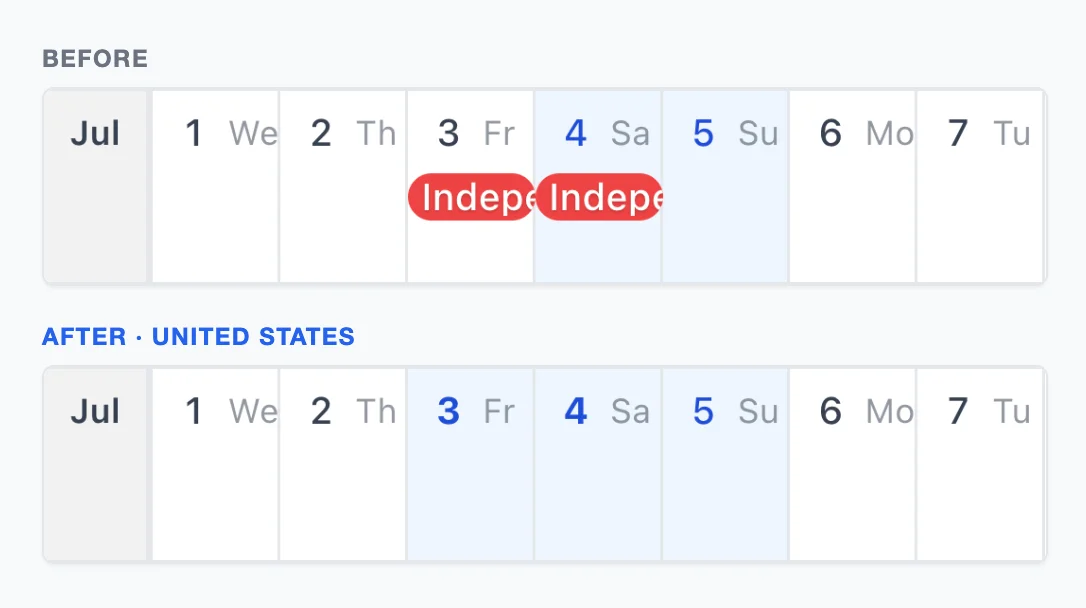
Until now, the way to get holidays into AnuCal was to sync Google’s holiday calendar. That works, but each holiday arrives as an event chip. The day itself still looks like any other weekday, so a Friday off sits in the grid like a working Friday, and you only notice the long weekend if you read the chip.
Now a holiday changes the day itself. Choose a country, and its public holidays get the same shading as your days off, with the date in bold. Long weekends and bridge days show up the way weekends do: at a glance, across the whole year.
Turn it on
- Open the calendar menu next to the calendar name and choose Display Options
- Under Public holidays, pick a country
It is off until you choose one. The setting belongs to the calendar, so a work calendar and a family calendar can follow different countries.
Read a holiday
- The shading matches your days off, so a holiday on a weekday reads as a day off
- The bold date tells a holiday apart from an ordinary weekend
- Point at the day to see the holiday’s name
- Click the date to open the day’s panel, where the name appears under the date
Names appear in your browser’s language when the data has it, and in English otherwise. The vertical layout shows holidays the same way.
Which days count
Only public holidays: the days off set by law, including substitute and observed days, such as Japan’s substitute holidays or the observed Independence Day in the United States when July 4 falls on a weekend. Days that only some places close for, such as Japan’s January 2 when banks are shut, and observances like Valentine’s Day are left out, because most people still work on them. Where a “bank holiday” is the country’s official day off, as in the United Kingdom, it is included.
AnuCal covers over 200 countries and territories.
If you sync Google’s holiday calendar
You can keep it. When the Google holiday calendar is for the same country, its chips for the same holidays are hidden, so a holiday is not shown twice. Everything else in that calendar, such as observances or another country’s holidays, stays as chips.
Where holidays appear
Because the country is a setting of the calendar, not your Google account, holidays appear wherever the calendar does:
- On published calendar pages and embedded calendars, where Google events never showed
- For the people you share the calendar with
- In a duplicated calendar, which keeps the country
Holidays are not events. They don’t count toward the 30 events on Free, they can’t be moved or edited, and they are not included in CSV export.
Plans
Public holidays work on every plan.
Credits
Holiday data comes from date-holidays, based on Wikipedia and shared under CC BY-SA 3.0. The ⓘ next to a holiday’s name in the day’s panel links to the license.