
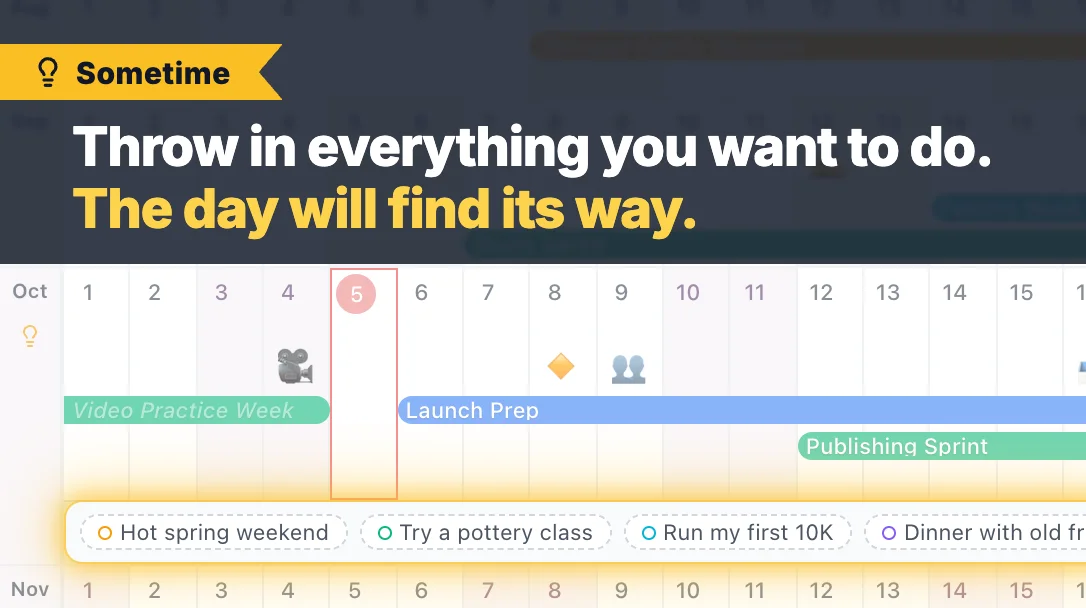
Some plans have a month but not a day. A weekend at the hot springs once the leaves turn, a first 10K, dinner with friends you keep meaning to see. Until now, the only way to keep them in AnuCal was to pick a day you had not really chosen — or to leave them out.
Sometime gives them a place of their own: a strip under each month. The days above stay as they are, so you can still see which ones are free — and that is usually what the decision comes down to.
Add a Sometime item
- On a month with nothing in Sometime yet, hover the month name and click the lightbulb
- On a month that already has items, click the small + at the end of its strip
- Or open any event and switch Date to Sometime. The arrows beside the month move it to another month
You can also drag an event you already have onto a month name or a strip. It becomes a Sometime item of that month; its days are dropped, and Cmd+Z (Ctrl+Z on Windows) brings them back. Repeating events and events from Google Calendar or another calendar stay on their days.
When you know the day
Drag the item onto that day. It becomes an ordinary event on that date.
Move and reorder
- Drag an item onto another month’s strip or name to move it there
- Drag it along its strip to change the order
- When a strip has more than fits, +N opens the whole month as a list. Hold an item over +N while dragging and the list opens, so you can drop it between the items it was hiding
Every drag can be undone. Dragging needs a mouse or trackpad; on a touch screen, open the item to change its month or give it a day.
Show or hide a month’s strip
The lightbulb by the month name also opens and closes that month’s strip. It is lit while the strip is open and gray while it is closed.
In the vertical layout
The strip sits under each month’s heading. If any month has its strip open, every month gets the row, so the days still line up across the year.
Where Sometime items appear
- In your calendar, and in the calendars you share with others
- In a duplicated calendar, which keeps them as Sometime items
- Not on published calendar pages, not in CSV export, and not when the calendar is overlaid on another one. Those show dated events only
Plans
Sometime works on every plan. On Free, each item counts as one of your 30 events, the same as any other event.