
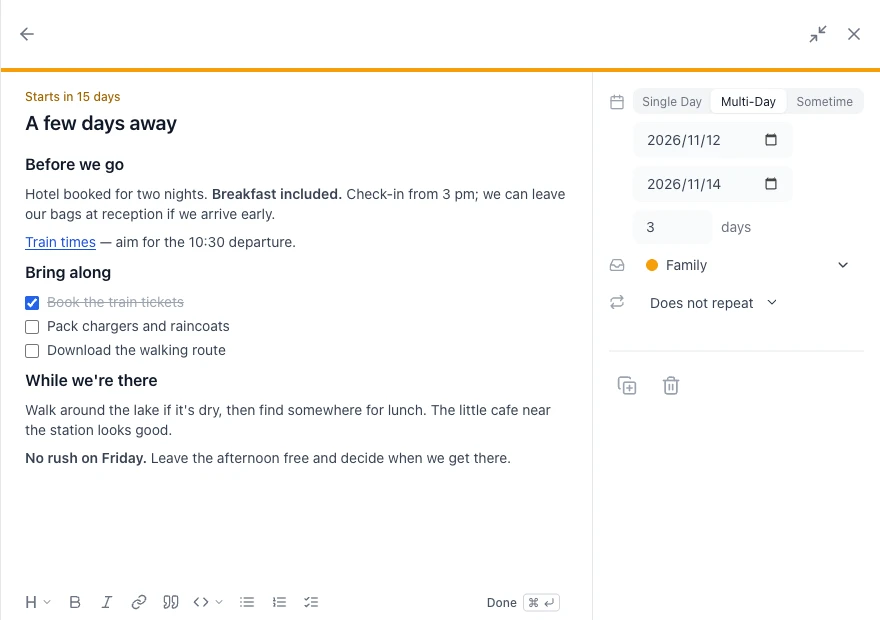
A hotel link in your trip’s notes. A restaurant link in a dinner plan. A reminder to bring an umbrella on an outing. There are often a few small things you want to keep with a plan.
We’ve made the description inside each event easier to use, so AnuCal can be a little more useful in your day. Write a quick note, add a link or make a checklist. A sentence or two is plenty.
Save it for sometime
Thinking about a short trip in November, but haven’t picked the dates? Put it in that month’s Sometime tray. Add a place you’d like to visit or a link a friend sent you, and come back to it later.
It could just as easily be a book you’d like to read that month, with a few words about why it caught your eye. The tray gives you somewhere to leave it until you have time.
When you pick a day, give the item a date. Your notes stay with it. More about Sometime.
Keep a short list
For that trip, you might add a packing checklist: charger, raincoat, tickets. Tick things off as you go. If you’re having friends over for a meal at home, you could list what to buy or who is bringing what.
If you’re working on something over a few weeks, leave a note about where you got to and what to do next. When you open the event again, it’s there to jog your memory.
Click the description to write. The toolbar lets you add a list, make a word bold or put in a link.
A bit more room when you need it
If you’re writing an itinerary or have a bit more to say, choose Expand panel at the top on desktop. It gives your notes more space, with the date and other details beside them.
You can shrink it again whenever you like and carry on where you left off.
Remember the good cafe
Afterwards, you might add the name of the cafe you liked, or a quick “next time, take the earlier train.” After a meeting, a couple of lines about what you decided can be handy too.
When you look back through the calendar, those little details are still with the day.
A little diary, one stamp at a time
You can also leave a note about an ordinary day. Add a ☀️ or 🌧️ stamp to record the weather, then open that stamp and use its description to jot down something good that happened. “A nice walk at lunch.” “Caught up with an old friend.” Just a few words, if that’s all you feel like writing.
The stamps show the weather across your calendar. Open one later and the note brings back a little more of that day. If you already use stamps as a life log, this gives you a place for the small things behind each emoji.
Just checking something?
Sometimes you only need to check a time or find a link. Google Calendar events and events in calendars shared for viewing now open in a small view beside the event. Choose Show more for a longer description. On mobile, it opens from the bottom of the screen.
Public calendars and overlaid calendars you can’t edit work this way too, so you can take a quick look and get back to what you were doing.
Already have it in your notes?
Maybe you’ve started a list in a notes app, or asked an AI tool for a few trip ideas. You can paste that into the description and edit it there.
Descriptions support Markdown, a common way of writing headings, bold text and lists using plain text. Paste a Markdown outline and the supported formatting comes with it. If you haven’t used Markdown, the toolbar has the same options.
Use it for whatever would be handy to find when you open that event again.